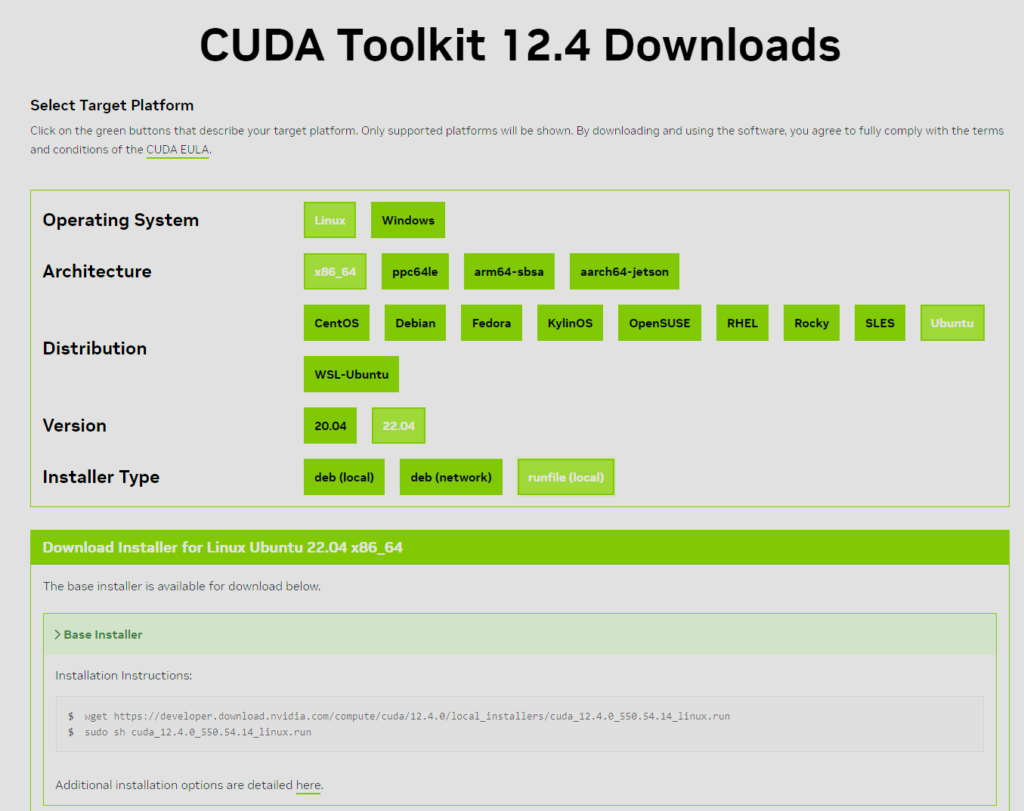
首先下载CUDA Toolkit for Linux Ubuntu 22.04 x86_64, 我这里采用runfile的方式:
wget https://developer.download.nvidia.com/compute/cuda/12.4.0/local_installers/cuda_12.4.0_550.54.14_linux.run
sudo sh cuda_12.4.0_550.54.14_linux.run
然后是稍微有些长的等待,而且没有错误就没有显示。静静的等待一下。。。
错误2
terminate called after throwing an instance of 'boost::filesystem::filesystem_error'
  what():  boost::filesystem::copy_file: No such file or directory: "./builds/cuda_cccl/targets/x86_64-linux/include/nv/target", "/usr/local/cuda-12.4/targets/x86_64-linux/include/nv/target"
Aborted (core dumped)
This system has been minimized by removing packages and content that are
not required on a system that users do not log into.

To restore this content, including manpages, you can run the 'unminimize'
command. You will still need to ensure the 'man-db' package is installed.
因为Ubuntu安装的时候采用了minimize最小化安装,所以有些命令缺失。解决方法也很简单
unminimize
这里等待的时间会久一点,如果以后要安装Jellyfin,不要选择minimize就对了。
错误4
error Existing package manager installation of the driver found. It is strongly │ recommended that you remove this before continuing.
因为你采用了不同的包来安装驱动,建议你移除后再重新安装CUDA,这里可以不用移除,直接使用命令覆盖
sudo sh cuda_12.4.0_550.54.14_linux.run --toolkit --silent --override
基本这个时候就不会有任何信息输出,Linux没有错误即成功。
卸载并全部重新安装
如果你碰到错误1里的error NVIDIA-SMI has failed because it couldn’t communicate with the NVIDIA driver. Make sure that the latest NVIDIA driver is installed and running.但都无法解决的话,或者碰到其他安装问题无法解决,那么考虑移除所有驱动及工具,从头再来吧
adb server version (39) doesn't match this client (40); killing...
could not read ok from ADB Server
* failed to start daemon
error: cannot connect to daemon
可以尝试再次运行adb命令行,出现类似以下内容即成功了
* daemon not running; starting now at tcp:5037
* daemon started successfully
Package com.google.android.gsf new state: disabled-user